
System-Reportgenerator
System : Reportgenerator
The report generator helps you to create lists such as the listing of customer data for a specific area.
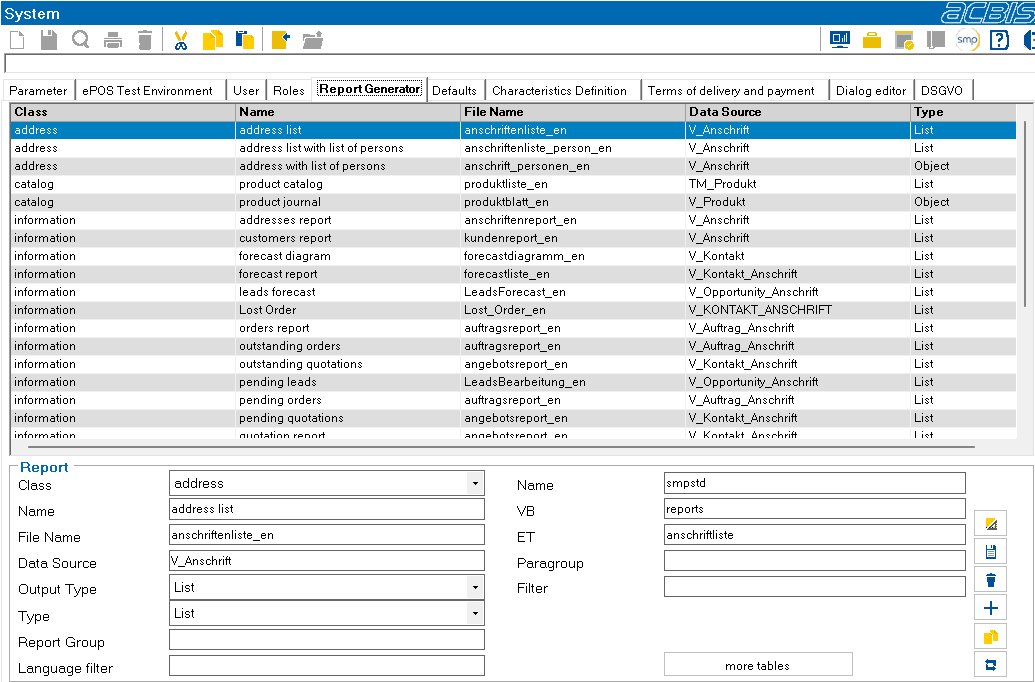
After selecting a report, it is offered for editing in the lower area.
Meaning of the symbols:

Start the design module of the List&Label report generator. The operation can be found in the help of the report generator.

Save changes.

Delete entry.

Create new entry.

Copy entry.

Transfer reports from the standard delivery. These are displayed in a list. Double-click on a report to transfer it to the active system. This affects the design of the report itself and also the table entries (TP_Repsystem etc.) for using the report.
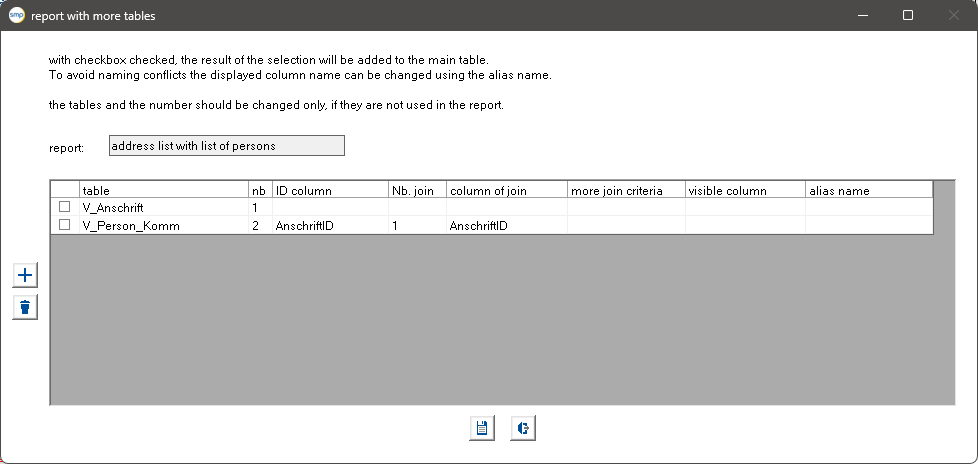
The class identifies the object class for which the report is defined. The name and file name can be freely selected. The data source is the view or table that provides the data basis for the report. The output type controls whether the report is created as a label (sheet) or as a list. The type indicates whether the report is used for individual objects (sheet) or for a list of objects. A column of the view or table that is assigned to the report can be entered as a language filter. With multilingual databases, too many data records could otherwise be displayed in the report, depending on the view. If the report is used for lists, it is possible to assign further (dependent) tables. For example, in the case of an address, the persons at the address can be included in the data source and in the report. You can enter these tables in an ePOS dialog using the “Additional tables” button:
Meaning of the symbols:
Add line
Delete line
Meaning of the columns:
Name | Bedeutung |
Table | Name of the table or view |
nb | Sequence number of the table in the report |
ID Column | Name of the column that identifies the relationship to the parent table |
Nb. join | Sequence number of the table in the report to which the relationship refers |
column of join | Name of the column to which the relationship refers |
more join criteria | Further conditions |
However, only tables/views that are dependent on the main table/view may be added. If an attempt is made to include a relationship that creates an n:1 relationship instead of a 1:1 or 1:n relationship, an error is displayed when the report is defined. If such data is required, a view should be created which contains the necessary data.
If desired, an ePOS set of rules can be run before a List&Label report is executed. If the columns VBG, VB and ET are filled out in the TP_RepSystem table, this is started before the report is executed. In this case, the current filter is written to the ePOS parameter entered under ParaFilter. At the end of the set of rules, the complete SQL command that collects the report data must also be written to this parameter. This extension option can be particularly useful when executing reports in the information system. The extended selection criteria are offered in an ePOS dialog, the SQL command is determined and returned to SalesManager. In this way, different selection criteria can be output with one report.