
System-Characteristic definition
System : Characteristic definition
Characteristics are created or edited in this dialog.
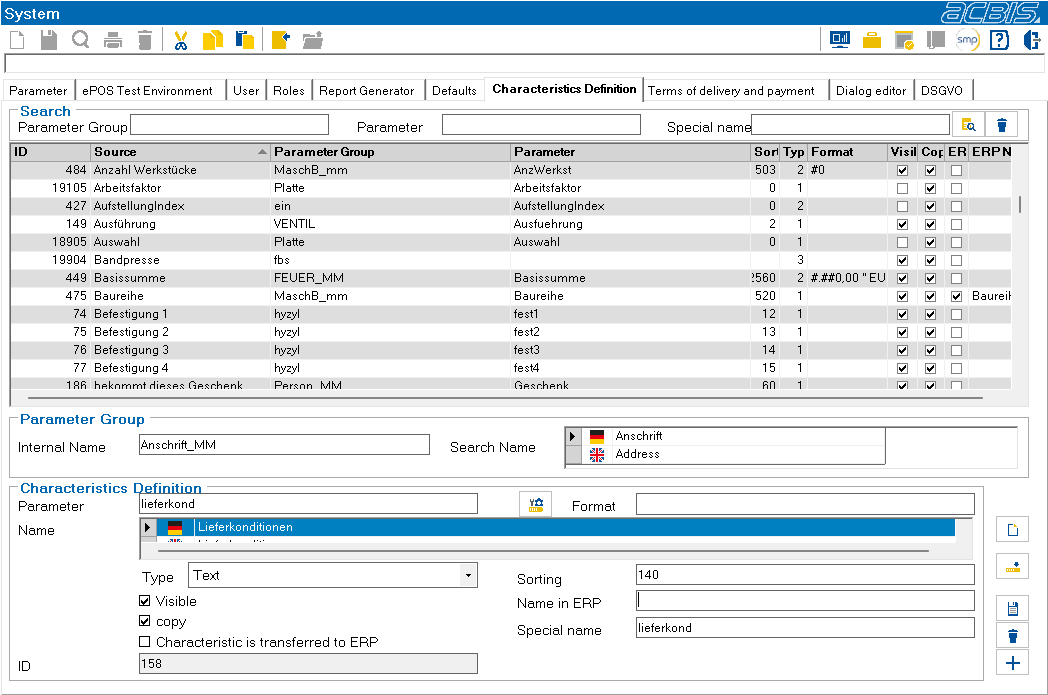
You can search for parameter groups and parameters in the upper text boxes.

This button starts the search.

This button clears the search fields.
By selecting a line in the characteristics list, this characteristic is offered for editing in the lower input area of the dialog.
Meaning of the fields:
Internal name: Name of the parameter group in ePOS
Search name:external name, e.g. for searching the parameter group (multilingual)
Parameter:Name of the parameter in ePOS
Format:Formatting of the characteristic value (format instruction as in ePOS)
Name:External designation of the feature (multilingual)
Type:Data type of the characteristic
Sorting:Sort sequence within the characteristics list
Visible:Feature is shown to the user in the feature list
Copy: Should this characteristic also be copied when the object is copied?
Characteristic is transferred to ERP:Characteristic is transferred to ERP
Name in ERP:Name of the feature in ERP
Special name:Name for own use
Description of the buttons:

Empty all input fields

Import parameter group from ePOS

Save changes
Delete characteristic

Create new characteristic