
Addresses-Documents
Addresses : Documents
Any documents relating to the address can be stored here. These documents can either refer to a file as a hyperlink or be saved in binary form. When referring to documents, care must be taken not to select any local directories, as otherwise other users will not have access to the documents. Links and hyperlinks offer the advantage that subsequent changes to the document are also displayed, and the advantage of less storage space in the database. In the case of binary documents, the path of the documents is irrelevant as they are located in the database and are read from there for display.
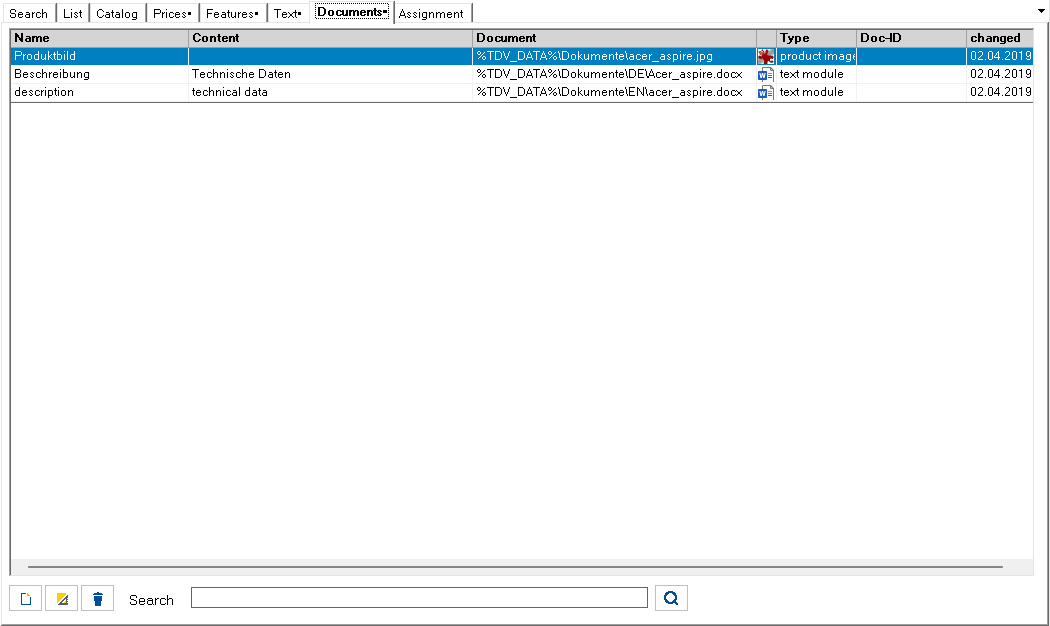
A simple way to capture documents is to drag and drop them from Windows Explorer into the list of documents. Emails from Outlook can also be copied to this list using drag & drop. After pasting, the editing window opens automatically:
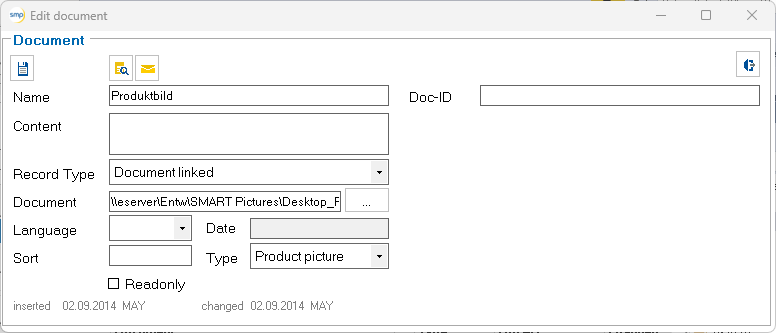
Meaning of the symbols:

Save entries and close dialog.

Show document in the preview.

Send document as e-mail. Note: This function is only possible with an Outlook connection.

Export a document. The folder can be selected.

Close dialog without saving.

Open file selection dialog.
Mit Hilfe der Dateiauswahldialog öffnen Schaltfläche können Dokumente von der lokalen Festplatte oder dem Netzwerk ausgewählt werden. Auf Wunsch können auch Verweise auf Internetseiten eingetragen werden. Um die Übersichtlichkeit zu erhöhen, wird den Dokumenten ein Typ zugeordnet. Die Liste der Dokumenttypen kann in der Tabelle TP_DokTyp gepflegt werden.
At the bottom of the form there are buttons to create a new entry, edit an entry, delete an entry and a search filter with the corresponding search button to filter entries in this list. The filter affects the following columns: Storage type, Language, Type, Docu-ID, Title, Content.

Meaning of the symbols:

Create new document
Save changes

Delete this document
Meaning of the symbol on the search button:

The term in the input line is searched for.

The input line is emptied.
Changing the search term switches back to search mode.